

What is the AI Tutor?
The AI Tutor is your personal assistant while solving coding questions. It helps you think through the problem, gives you smart hints, and guides you step by step—without directly giving the answer. The goal? To make you a better problem solver.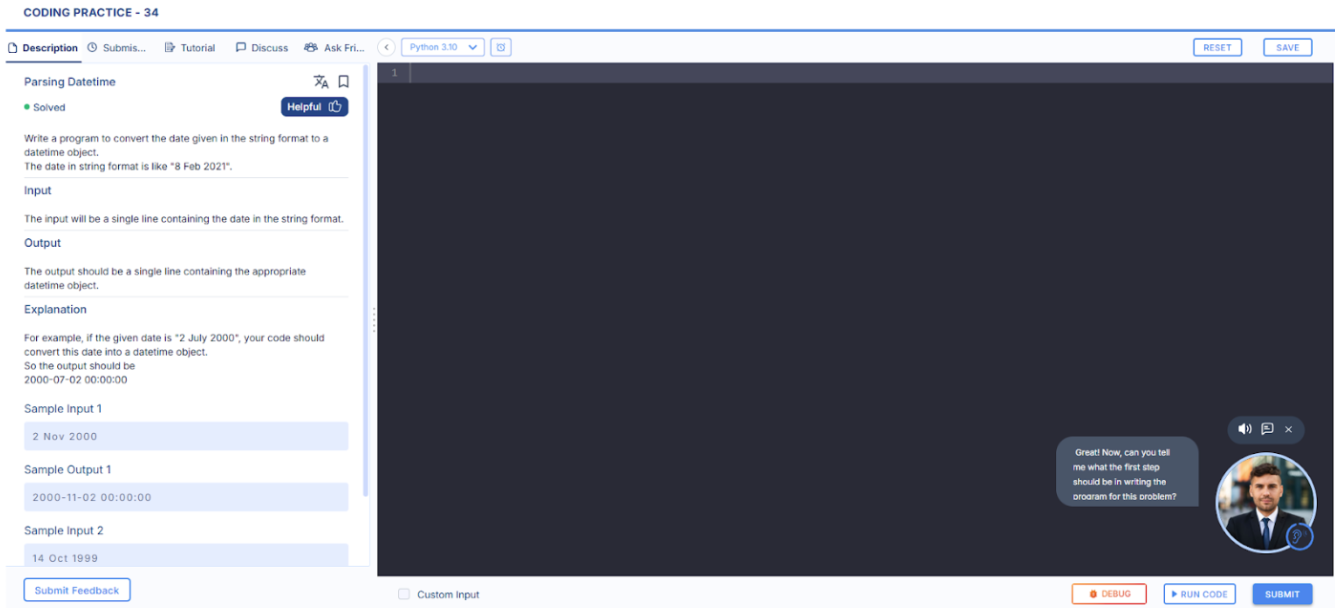
Why It’s Here
The AI Tutor is designed to:- Help you when you’re stuck or unsure where to start
- Improve your problem-solving skills
- Guide you with hints instead of answers so you actually learn
- Reduce frustration when debugging errors
How It Works
Here’s how you use it:When Does It Trigger?
- Automatically if you’re inactive for 5 minutes or after a wrong submission
- Manually when you click the Tutor icon or say “Hey Tutor”
How It Interacts
- A small circle icon appears at the bottom-right corner when active
- The Tutor talks to you through voice, and a text transcript appears alongside
- It will ask clarifying questions like:
“What do you think this part of the code is doing?”
“Have you considered using a loop here?”
Step-by-Step Guidance
- You’ll get structured hints, not just solutions
- It helps with debugging, understanding logic, and starting the problem
- You can end the session anytime if you’ve figured it out
Example Use Cases
- You’ve submitted the wrong output and can’t find what’s wrong. Tutor helps you debug.
- You’re stuck reading a tough question. The tutor walks you through it, one part at a time.
- You feel overwhelmed and haven’t started yet. The tutor gives you leading questions to get started.
Pro Tips from a Senior
- Don’t wait too long—if you’re stuck, click the Tutor icon or say “Hey Tutor.”
- Don’t skip the hints. They’re structured to help you learn, not just solve.
- Speak clearly! The Tutor is voice-based, so treat it like talking to a real mentor.
- Use it often and early—it’s better to ask for help than to stay stuck.