> ## Documentation Index
> Fetch the complete documentation index at: https://nxtwavedisruptivetechnologiesprivatelimited.mintlify.site/llms.txt
> Use this file to discover all available pages before exploring further.
# 🧠 Question Bank
> Your All-in-One Practice Hub
## **What Is the Question Bank?**
The **Question Bank** is your go-to space for practicing all your unlocked **coding questions and assignment problems** in one place. Whether you're revising before an interview or brushing up on past topics, this is where you’ll find every problem you’ve unlocked—organized and ready to go.
 The Question Bank unlocks automatically after you complete **Growth Cycle 1 (GC-1)**.
***
## **Why Use It?**
No more clicking through multiple courses to find questions. The Question Bank:
* Brings all your coding questions together
* Helps you focus with filters by **course**, **topic**, or **status**
* Syncs your progress with the rest of your learning portal in real time\
It’s built to make your practice smarter, faster, and more efficient.
***
## **How to Use the Question Bank**
Here’s how to make the most of it:
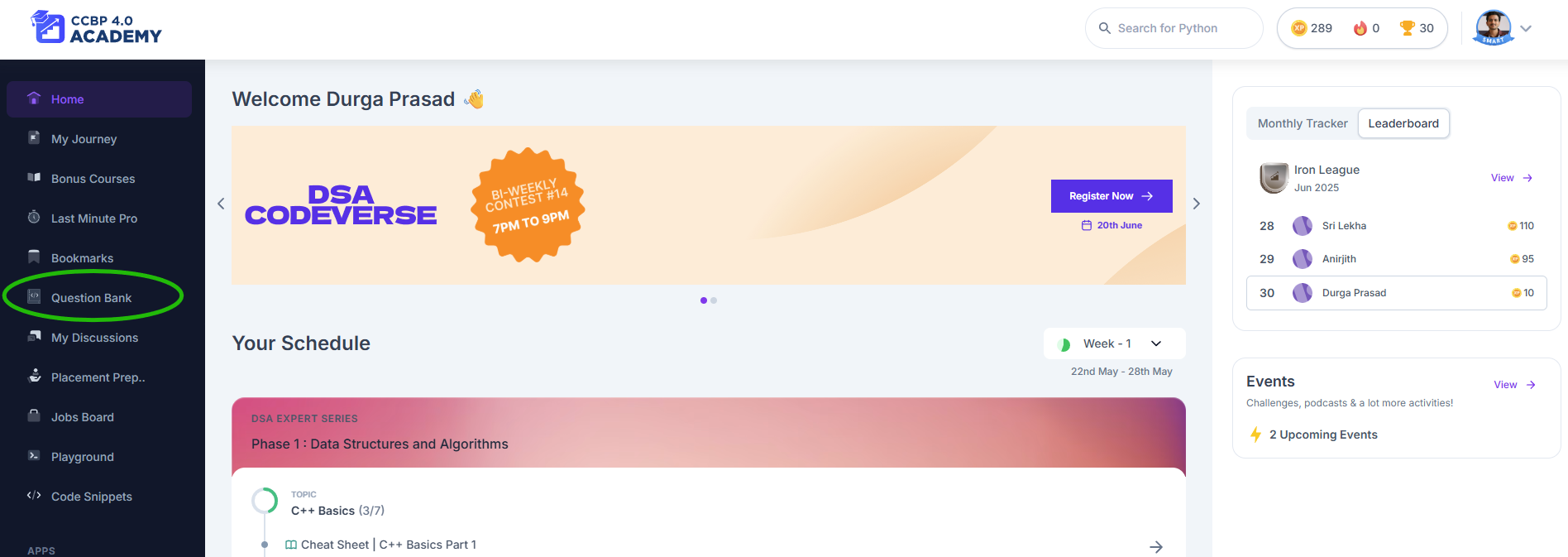
1. **Click on “Question Bank”** from the left-hand menu in your learning portal.
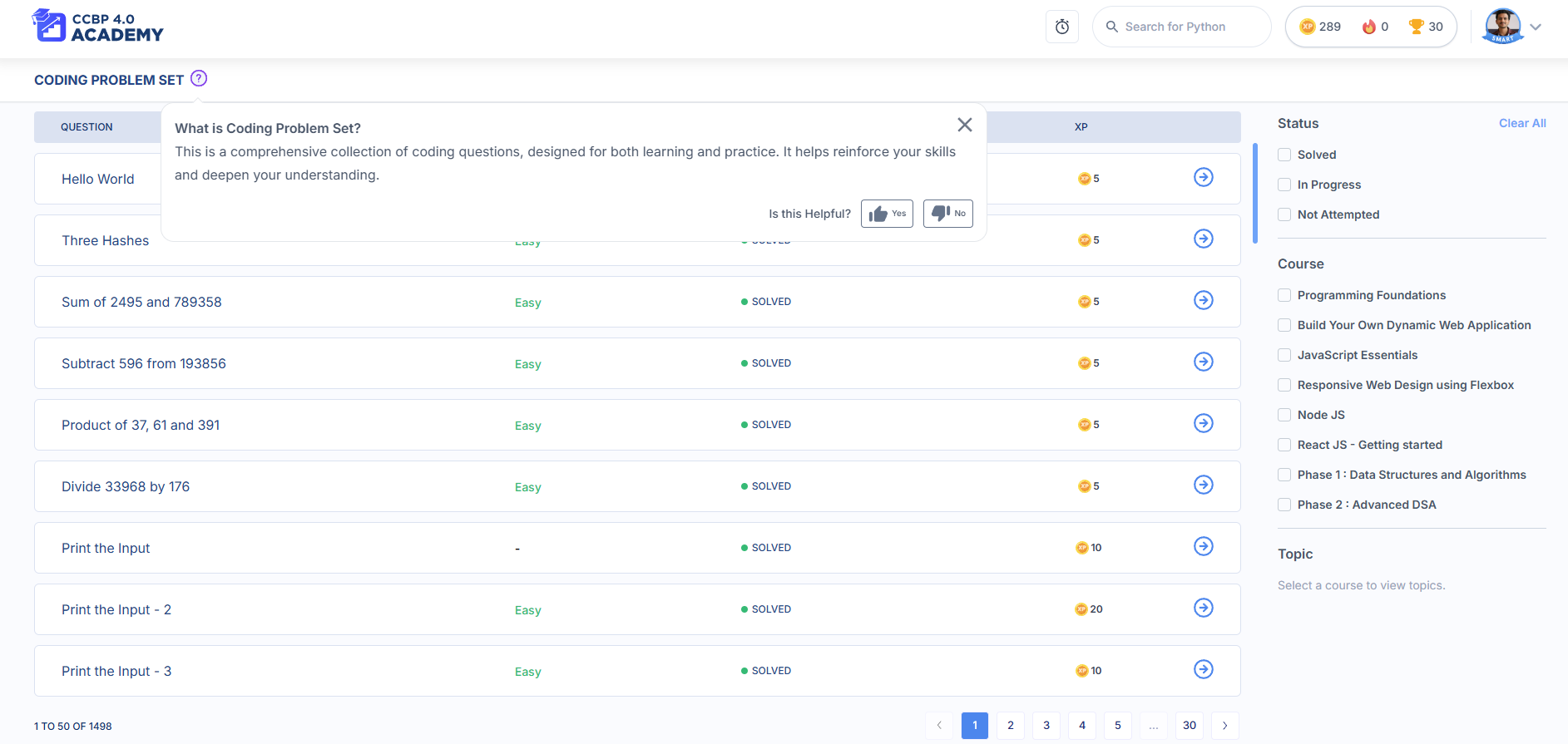
2. You’ll see a **list of 50 questions per page**, ordered the same way as they appear in your courses.
3. **Use filters** like:
* **Status** (In Progress, Completed)
* **Course** (e.g., Cracking IDP, Programming Foundations)
* **Topic** (e.g., Loops, Arrays)
4. **Click a question** to open it in the familiar coding interface.
5. Your **completion status updates automatically**—no need to worry about tracking.
6. Use **pagination** at the bottom to navigate through the rest of your questions.
You’ll only see questions you’ve unlocked through regular course progression.
***
## **What Makes It Great?**
* **Centralized revision**: Everything you’ve learned and unlocked, in one place
* **Live sync**: Your status is updated both in the Question Bank and your course flow
* **Custom filters**: Pinpoint the exact type of questions you want to solve
* **Easy navigation**: Clear layout with tags, progress labels, and sorting options
***
## **When Should You Use It?**
* Before exams, filter by **“Completed”** to review questions you’ve already solved
* If you’re stuck in a topic, filter **“In Progress” + specific topic** to focus your efforts
* When preparing for interviews, use it as your **personal LeetCode inside NxtWave**
***
## **Pro Tips**
* Use it **weekly** to review and practice older topics
* Clean up your “In Progress” questions by solving and submitting them
* Avoid jumping around randomly—set a goal like “Finish 10 Questions from Loops today”
***
## **Where Can You Use It?**
✅ Works on **desktop, mobile, and tablet**\
✅ Best viewed in browsers like Chrome, Firefox, Edge, Safari
***
The **Question Bank** is built to support your journey—from beginner to interview-ready pro. Make it a habit to check in, practice, and stay sharp. You’ve already unlocked the questions—now go unlock your full potential!
The Question Bank unlocks automatically after you complete **Growth Cycle 1 (GC-1)**.
***
## **Why Use It?**
No more clicking through multiple courses to find questions. The Question Bank:
* Brings all your coding questions together
* Helps you focus with filters by **course**, **topic**, or **status**
* Syncs your progress with the rest of your learning portal in real time\
It’s built to make your practice smarter, faster, and more efficient.
***
## **How to Use the Question Bank**
Here’s how to make the most of it:
1. **Click on “Question Bank”** from the left-hand menu in your learning portal.
2. You’ll see a **list of 50 questions per page**, ordered the same way as they appear in your courses.
3. **Use filters** like:
* **Status** (In Progress, Completed)
* **Course** (e.g., Cracking IDP, Programming Foundations)
* **Topic** (e.g., Loops, Arrays)
4. **Click a question** to open it in the familiar coding interface.
5. Your **completion status updates automatically**—no need to worry about tracking.
6. Use **pagination** at the bottom to navigate through the rest of your questions.
You’ll only see questions you’ve unlocked through regular course progression.
***
## **What Makes It Great?**
* **Centralized revision**: Everything you’ve learned and unlocked, in one place
* **Live sync**: Your status is updated both in the Question Bank and your course flow
* **Custom filters**: Pinpoint the exact type of questions you want to solve
* **Easy navigation**: Clear layout with tags, progress labels, and sorting options
***
## **When Should You Use It?**
* Before exams, filter by **“Completed”** to review questions you’ve already solved
* If you’re stuck in a topic, filter **“In Progress” + specific topic** to focus your efforts
* When preparing for interviews, use it as your **personal LeetCode inside NxtWave**
***
## **Pro Tips**
* Use it **weekly** to review and practice older topics
* Clean up your “In Progress” questions by solving and submitting them
* Avoid jumping around randomly—set a goal like “Finish 10 Questions from Loops today”
***
## **Where Can You Use It?**
✅ Works on **desktop, mobile, and tablet**\
✅ Best viewed in browsers like Chrome, Firefox, Edge, Safari
***
The **Question Bank** is built to support your journey—from beginner to interview-ready pro. Make it a habit to check in, practice, and stay sharp. You’ve already unlocked the questions—now go unlock your full potential!