> ## Documentation Index
> Fetch the complete documentation index at: https://nxtwavedisruptivetechnologiesprivatelimited.mintlify.site/llms.txt
> Use this file to discover all available pages before exploring further.
# 💬 My Discussions
> Track All Your Doubts in One Place
## **What Is "My Discussions"?**
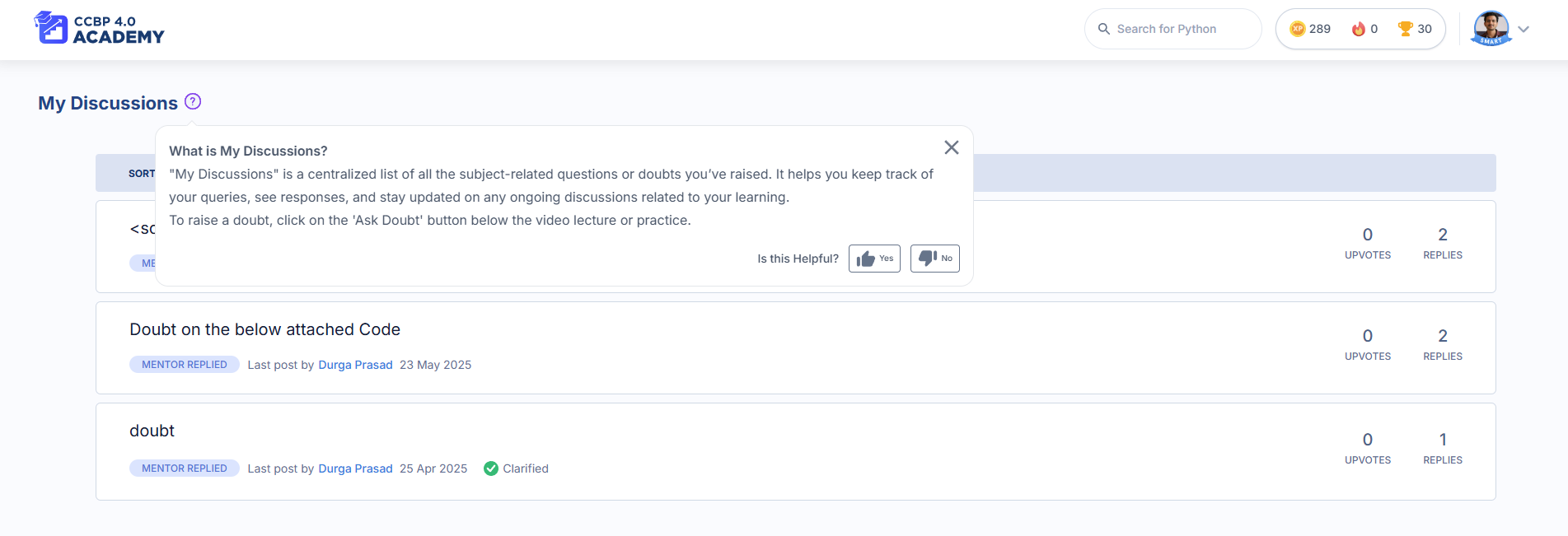
**My Discussions** is your personal space to view, manage, and follow up on all the subject-related questions you’ve asked in your learning portal—whether it’s during a session, coding practice, or assignment. It helps you stay organized, see replies from Domain Experts, and keep learning without confusion.
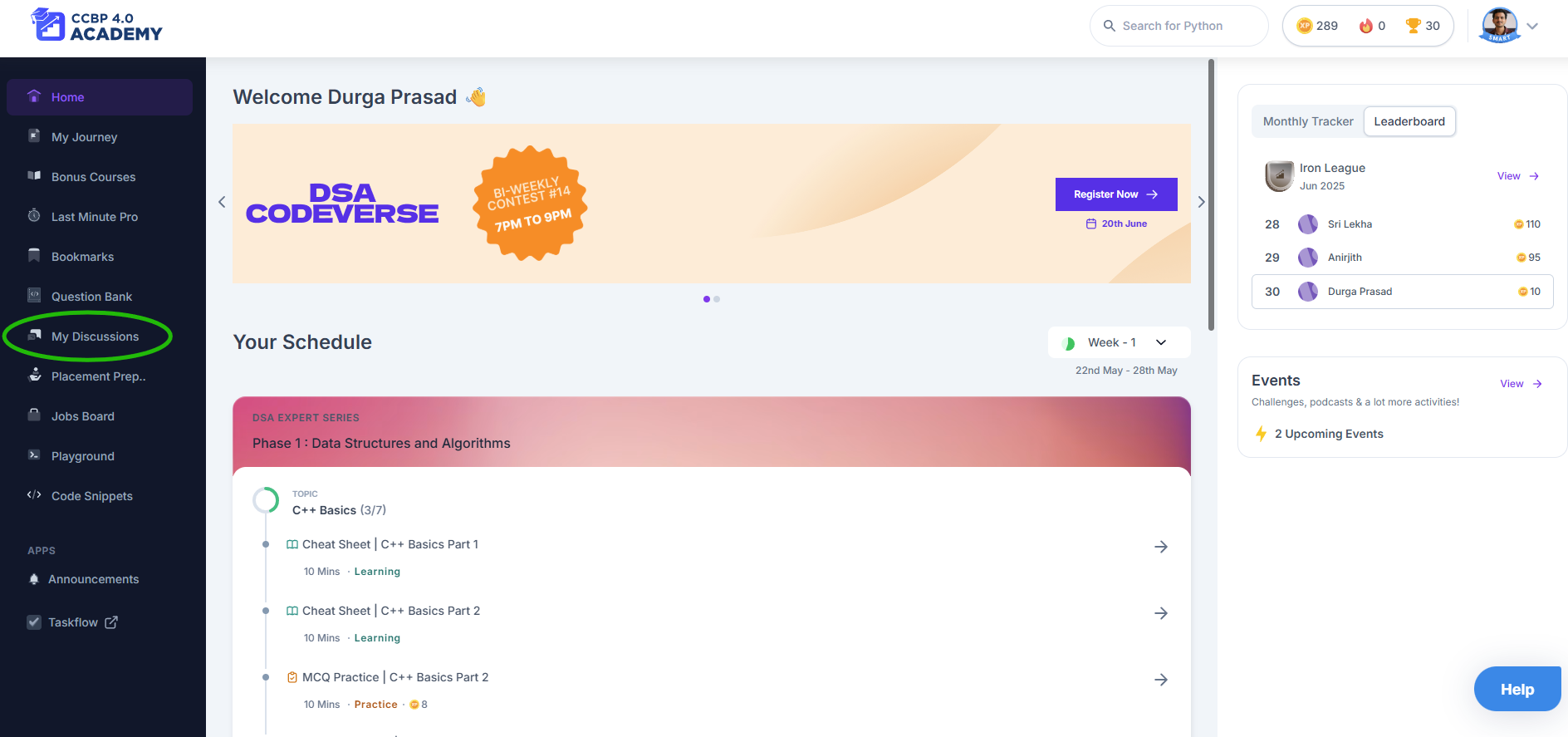
 You’ll find it in the sidebar of your learning portal. Just click **My Discussions**.
***
## **Why Use It?**
* You don’t need to search through sessions to find your past doubts
* Get expert-verified answers in one place
* See helpful replies from other students too
* Continue the conversation when you need further clarification
It’s like having your own doubt dashboard—built just for you.
***
## **How to Use "My Discussions"**
Here’s a step-by-step guide:
1. **Ask a Doubt**\
While watching a session or solving a problem, you’ll see a **“Have a doubt?”** section. Post your question there.
2. **Get an Initial Reply**\
The Mentor Bot may respond instantly with helpful resources or similar questions.
3. **Need More Help?**\
Click **“Didn’t help”**, and your query is forwarded to our **Domain Experts**—you’ll get a proper answer within **12 working hours** (Mon–Fri).
4. **Visit My Discussions**\
Click **My Discussions** in your left-hand menu to view:
* All the questions you’ve asked
* Status (Answered / Open)
* Last reply date
5. **Engage with the Thread**\
You can reply, ask for more clarity, or just say thank you 😊
6. **Upvote What Helps You**\
If another student’s question or an expert's answer helps you too, give it an upvote!
***
## **What Makes It Useful?**
* **Everything in One Place**: No need to remember where you asked a question
* **Verified Knowledge**: Domain Experts give precise, student-friendly explanations
* **Learn Together**: See what others are asking and learn from shared discussions
* **Stay Notified**: You’ll see updates when your question gets answered
***
## **When Should You Use It?**
* When a video explanation isn’t clear
* When you're stuck in a coding practice problem
* When your doubt hasn't been answered by the bot
* When you want to see how others are thinking through the same concept
***
## **Pro Tips**
* Always **describe your doubt clearly** (mention the concept or question name)
* **Check for similar discussions** before posting to avoid duplicates
* **Mark helpful replies with an upvote**—it helps others too
* Come back and **review resolved queries** before tests or interviews
***
## **Works On:**
* Desktop ✅
* Laptop ✅
* Mobile ✅ (via browser)
***
**"My Discussions" helps you stay curious and confident. Don’t hesitate to ask your doubts—it’s how you grow faster.** 🌱
You’ll find it in the sidebar of your learning portal. Just click **My Discussions**.
***
## **Why Use It?**
* You don’t need to search through sessions to find your past doubts
* Get expert-verified answers in one place
* See helpful replies from other students too
* Continue the conversation when you need further clarification
It’s like having your own doubt dashboard—built just for you.
***
## **How to Use "My Discussions"**
Here’s a step-by-step guide:
1. **Ask a Doubt**\
While watching a session or solving a problem, you’ll see a **“Have a doubt?”** section. Post your question there.
2. **Get an Initial Reply**\
The Mentor Bot may respond instantly with helpful resources or similar questions.
3. **Need More Help?**\
Click **“Didn’t help”**, and your query is forwarded to our **Domain Experts**—you’ll get a proper answer within **12 working hours** (Mon–Fri).
4. **Visit My Discussions**\
Click **My Discussions** in your left-hand menu to view:
* All the questions you’ve asked
* Status (Answered / Open)
* Last reply date
5. **Engage with the Thread**\
You can reply, ask for more clarity, or just say thank you 😊
6. **Upvote What Helps You**\
If another student’s question or an expert's answer helps you too, give it an upvote!
***
## **What Makes It Useful?**
* **Everything in One Place**: No need to remember where you asked a question
* **Verified Knowledge**: Domain Experts give precise, student-friendly explanations
* **Learn Together**: See what others are asking and learn from shared discussions
* **Stay Notified**: You’ll see updates when your question gets answered
***
## **When Should You Use It?**
* When a video explanation isn’t clear
* When you're stuck in a coding practice problem
* When your doubt hasn't been answered by the bot
* When you want to see how others are thinking through the same concept
***
## **Pro Tips**
* Always **describe your doubt clearly** (mention the concept or question name)
* **Check for similar discussions** before posting to avoid duplicates
* **Mark helpful replies with an upvote**—it helps others too
* Come back and **review resolved queries** before tests or interviews
***
## **Works On:**
* Desktop ✅
* Laptop ✅
* Mobile ✅ (via browser)
***
**"My Discussions" helps you stay curious and confident. Don’t hesitate to ask your doubts—it’s how you grow faster.** 🌱