> ## Documentation Index
> Fetch the complete documentation index at: https://nxtwavedisruptivetechnologiesprivatelimited.mintlify.site/llms.txt
> Use this file to discover all available pages before exploring further.
# 🔖 Bookmarks
> Save Your Most Important Questions
## **What Is the Bookmarks Feature?**
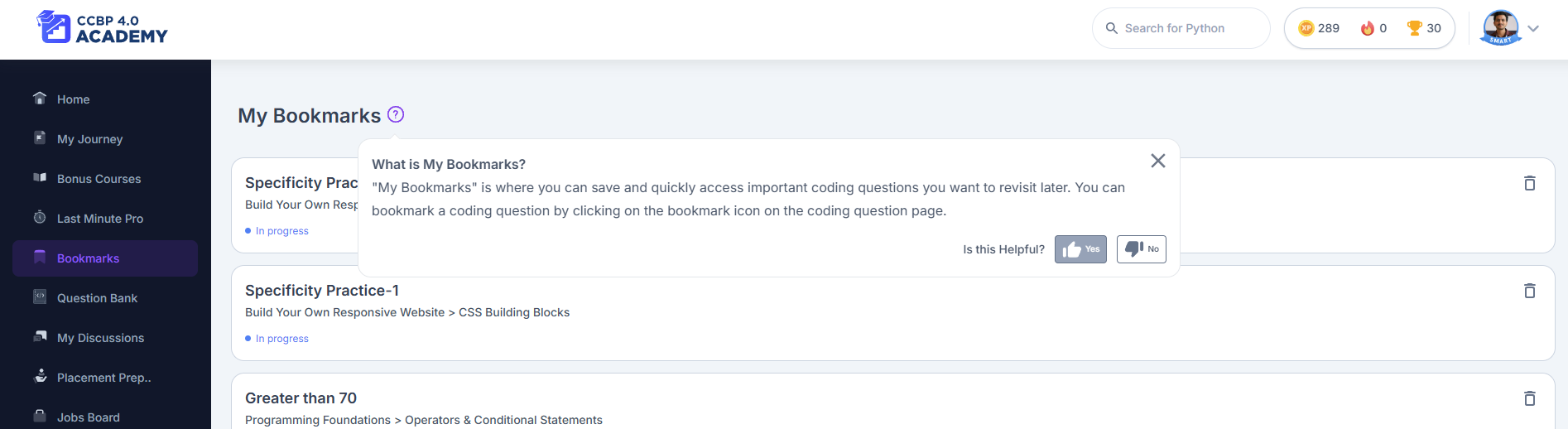
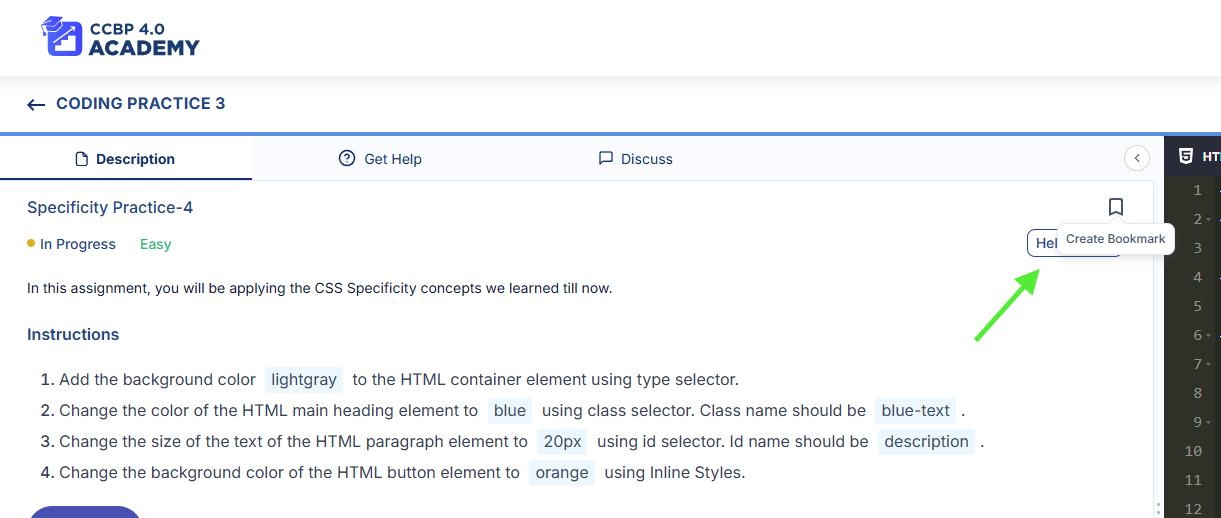
The [**Bookmarks**](https://learning.ccbp.in/bookmarks) feature helps you quickly **save coding practice questions or assignment problems** that you want to revisit later. Whether it’s a tricky DSA problem or a coding question you want to review before your next cycle or interview—just hit the bookmark icon, and it’ll be saved for easy access.
 Note: You can only bookmark **coding and assignment questions**. Sessions, cheat sheets, and other materials cannot be bookmarked.
***
## **Why Use Bookmarks?**
We know you come across questions worth reviewing again later. The **Bookmarks tab** gives you a clean, organized space to collect them—so you don’t waste time searching through everything all over again.\
Use it for:
* Revision before assessments
* End-of-cycle reviews
* Interview prep
***
## **How to Use It**
Here’s how to start bookmarking:
1. **While solving a coding or assignment question**, look for the **bookmark icon** (usually at the top of the page).
2. **Click the icon** to save the question—no extra steps needed.
3. Go to the **Bookmarks tab** in your Learning Portal's left-hand menu. Or go directly to [learning.ccbp.in/bookmarks](https://learning.ccbp.in/bookmarks) .
4. You’ll see a list of all your bookmarked questions. Just click on any to revisit it instantly.
Hover over “What is My Bookmarks?” on the page to learn more about what can and can’t be bookmarked.
***
## **Why You’ll Love It**
* Easily track **challenging or high-value questions**
* No more digging through past modules to find that one tough problem
* Perfect for **focused, efficient revision** before exams or placements
***
## **Best Practices**
* Bookmark questions you genuinely want to **master or revisit**
* Remove items you’ve already covered to keep your list clean
* Use your bookmark list regularly during **weekly reviews** or **interview prep sprints**
***
## **Where Can You Use It?**
✅ Works on **desktop, tablet, and mobile browsers**
❌ Not available in mobile app (if applicable)
***
So next time you come across a question you want to revisit later—just hit that bookmark icon. It’s your personal “save for later” list inside the portal, designed to make your revision faster and smarter.
Note: You can only bookmark **coding and assignment questions**. Sessions, cheat sheets, and other materials cannot be bookmarked.
***
## **Why Use Bookmarks?**
We know you come across questions worth reviewing again later. The **Bookmarks tab** gives you a clean, organized space to collect them—so you don’t waste time searching through everything all over again.\
Use it for:
* Revision before assessments
* End-of-cycle reviews
* Interview prep
***
## **How to Use It**
Here’s how to start bookmarking:
1. **While solving a coding or assignment question**, look for the **bookmark icon** (usually at the top of the page).
2. **Click the icon** to save the question—no extra steps needed.
3. Go to the **Bookmarks tab** in your Learning Portal's left-hand menu. Or go directly to [learning.ccbp.in/bookmarks](https://learning.ccbp.in/bookmarks) .
4. You’ll see a list of all your bookmarked questions. Just click on any to revisit it instantly.
Hover over “What is My Bookmarks?” on the page to learn more about what can and can’t be bookmarked.
***
## **Why You’ll Love It**
* Easily track **challenging or high-value questions**
* No more digging through past modules to find that one tough problem
* Perfect for **focused, efficient revision** before exams or placements
***
## **Best Practices**
* Bookmark questions you genuinely want to **master or revisit**
* Remove items you’ve already covered to keep your list clean
* Use your bookmark list regularly during **weekly reviews** or **interview prep sprints**
***
## **Where Can You Use It?**
✅ Works on **desktop, tablet, and mobile browsers**
❌ Not available in mobile app (if applicable)
***
So next time you come across a question you want to revisit later—just hit that bookmark icon. It’s your personal “save for later” list inside the portal, designed to make your revision faster and smarter.